

ライブ・ア・ヒーロー!
Copyright© 2020 Lifewonders, LLC. All Rights Reserved.
Stamina and User Rank

When playing Live A Hero, you possess a Stamina resource.
You will use this Stamina to access certain quests.
It recovers over time, and you can restore it with Stamina Drinks and Ether Crystals.
Your current stamina can be checked at the top of the screen.
You recover 1 stamina every 8 minutes.
With some exceptions, your stamina will not be used up if you lose in battle.
As you win battles and gain user experience, your User Rank will increase.
Higher Rank levels will grant you bigger stamina pools, and ranking up will fully restore your stamina as well.
Maximum stamina increase rates change starting at Rank 80.

Heroes and Sidekicks

Hero is the general term for all characters who can take part in battle.
You can obtain them through Ether Searches and as mission rewards.
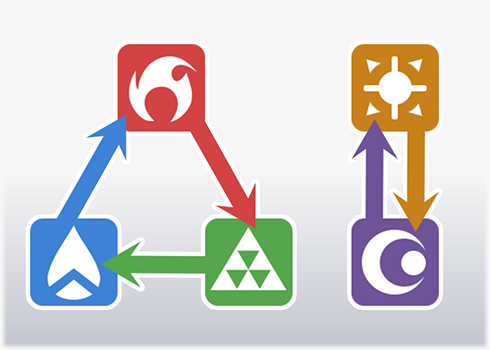
Each hero has one of the five affinities currently available:
Fire, Water, Wood, Light, and Shadow.
Each affinity has an advantage against one and a disadvantage against another.
while a disadvantageous affinity means you deal less damage and take more. The affinity relationships are as follows:
  • Fire has the advantage over Wood but a disadvantage against Water.
  • Wood has the advantage over Water but a disadvantage against Fire.
  • Water has the advantage over Fire but a disadvantage against Wood.
  • Light has the advantage over Shadow but takes more damage from it.
  • Shadow has the advantage over Light but takes more damage from it.
A Hero's role is a concise descriptor of what they can do.
There are 8 in all: Attacker, Guardian, Debuffer, Support, Healer, Specialist, Speedster, and Entertainer.
Use roles as a guide when forming your teams.
Heroes have the following parameters, or stats, they use in battle.

HP A Hero's vitality. When it hits zero, they are knocked out and unable to continue fighting.
ATK A Hero's attack power. The higher it is, the more damage they deal to their targets.
SPD A Hero's speed. The higher it is, the sooner they can take their actions and use their skills.
View The base amount of View Power a Hero gains in battle when taking any action other than waiting.

You may find out more about View Power in the Quest Battle section later.
A Hero's level, shows how much power they have accumulated.
Also written as LV.
They start at level 1 when you first get them, but become stronger as you gain quest experience, complete sales missions, and consume EXP items.
When a Hero's level increases, so do all of their parameters except SPD.
A Hero's rank indicates their current level limit.
Their rarity when obtained becomes their initial rank.

Increasing a Hero's rank will gain them the benefits listed below.

■ Increased Max Level
The Hero's max level increases, as written below.
・Rank 1: 10
・Rank 2: 20
・Rank 3: 30
・Rank 4: 40
・Rank 5: 50
・Rank 6: 60

■ Increased Base Stats
The Hero's base stats will increase.
Different Heroes will see different stat increases.

■ Stronger Skills
Some Hero skills will become stronger, or the Hero will gain a new skill.
The rank the skill boost or new skill is gained at depends on their initial rarity.
Initial Rarity 1 or 2: Rank 3 and 5
Initial Rarity 3 or 4: Rank 5
Initial Rarity 5: Rank 6

■ Appearance Change
Heroes with an initial rarity of 3 or higher can take on different appearances when they reach Rank 5.
You will be able to toggle their new appearance on their details screen.
Heroes with an initial rarity of 2 or lower will not gain a new appearance at Rank 5.

■ Voice Line
When a Hero with an initial rarity of 3 or higher reaches Rank 6, their Max Rank voice line will be unlocked.
As with all their voice lines, you can listen to it from their details screen.

Skills are commands that can be selected in battle and have a variety of effects,
such as damaging foes or healing allies, all of which depend on the Hero.
Each Hero has multiple skills, some of which improve with rank increases.
Finally, skills require a resource called View Power to activate.
Sidekick is the general term for all characters who can form Duos with Heroes.
During battle, a Sidekick's parameters are added to a Hero's.
These parameters can be increased by boosting Relations between the Sidekick and Hero in question.
A Sidekick's ascension determines the max Relations they can attain with a hero.
It can be increased by using Sidekick Heart items on them.
Sidekicks also have skills.
They can be used in battle by the Hero the sidekick is partnered with.
Relations are the bonds between Heroes and Sidekicks.
Because they are specific to each pair, Relations do not carry over when a Sidekick is paired with another hero.
Relations can be increased by sending the Duo out on quest battles to gain EXP or by selecting Improve Relations and using items.
The higher Relations are, the more of a parameter boost the Sidekick will give their paired Hero.
When Relations hit 50 or higher, the Hero in the Duo can receive an Equipable Skill from the Sidekick, bolstering their strength in battle.
Once a Hero and Sidekick's Relations hit 50 or higher, the Hero can receive an Equipable Skill from their Sidekick.
You can equip them on the Team Formation screen, granting the Hero unique effects.
Equipable skills are saved with the team.
Equipable Skills are gained when Relations with a Sidekick hits 50, and they are strengthened at 60, 70, 80, 90, and 100.

Quests

When undertaking quests, you can read story scenes, engage in battles, and gain items.
In the quest selection screen, you can press and hold the quest banner or tap the magnifying glass button to see what enemies will be in the quest and what items can be obtained.
In the main quest, you can read through the game's main story.
These are quests where you can gain items to strengthen your characters.
Here, you'll find the always-available EXP Item quests, Ticket Quests that require Quest Tickets, and Rank Up Item Quests that offer Rank Up items for a different affinity each day.
The available Rank Up items by day are as follows:
  • Monday: Light Affinity
  • Tuesday: Fire Affinity
  • Wednesday: Water Affinity
  • Thursday: Wood Affinity
  • Friday: Shadow Affinity
  • Saturday: Light, Fire, and Water Affinity
  • Sunday: Wood and Shadow Affinity
These are quests you can enter using the quest tickets obtained as login bonuses.
They give more rewards than normal quests.
You'll find Character Quests, Skill Tree Quests, and others here.
Character Quests allow you to learn about the characters, and more quests are added over time.
Each Character Quest has a unique set of conditions required to unlock it.
For example, some require you to have a certain Hero or Sidekick, or to have cleared another specific quest.
Some Heroes have Skill Trees, and you need to complete these quests to unlock them.
Before you can play a Skill Tree Quest, however, you will need to Bloom the relevant Hero.
The Boss Simulator allows you to fight boss-level opponents and reap great rewards as a result.
Scores are assigned based on the state you end the quest in, with a better score earning you more of an item called Heronium. This Heronium can be traded at the Exchange for Growth items and more.

Specific characters receive bonuses in the Boss Simulator.
Unlike normal quests, a single Boss Simulator quest bout can include multiple battles, with characters carrying over the damage they receive from one battle to the next.

Exchange reward limits and bonus-eligible characters for Boss Simulator quests are updated every two weeks.
Here, you can view the Event Main Quests of previously held limited-time Events.
However, you will be unable to gain first clear rewards from them, nor will you gain battle rewards.

Quest Battles

In battles, you can select a Hero and Sidekick Duo you've assigned and have them fight against Kaibutsu and other Heroes.
Winning in battle will gain you a variety of rewards.
Characters act according to their action order on the timeline.
Their position on the timeline is determined by their SPD.
When a character's action comes up, you may select one of their skills to activate.
Press the Auto button in the top right corner of the battle screen to enter Auto Battle mode.
In Auto Battle mode, characters will only use their first skills.
You can resign from a quest battle by pressing the Menu button at the bottom right corner of the battle screen.
While pressing the List button in the bottom right corner of the battle screen, you can see your deployed Heroes' skills and how much View Power those skills need.
Located at the bottom of the screen, View Power is the viewers' collective power which is required to activate skills.
Each time a character acts, View Power increases by their Views stat.
View Power can also be gained by using some skills.
Status effects affect characters in various ways during battle.
Each status effect has a turn count established for it, and the count decreases when certain conditions are met, such as a certain number of actions being taken or a turn ending.
Status effects that grant positive effects on Heroes are displayed with yellow icons and are called "buffs,"
while those that grant negative effects on Heroes are displayed with blue icons and are called "debuffs."
Common status effects are as follows:

Buffs

ATK Up: ATK becomes 1.5x of normal. Turn count passes with actions.
ATK Up+: ATK becomes 1.8x of normal. Turn count passes with actions. Treated as the same status effect as ATK.
Athleticism: Gain 30% of own Views stat in ATK. Turn count passes with actions. Cannot stack.
Madness: ATK doubles and the character takes 15% of HP as damage at the end of the turn. The character enters Auto Battle while under the effects of Madness. Turn count passes when the turn ends. Cannot stack.
DEF Up: Reduce damage taken from opponents by half one time. Turn count passes when damage is taken.
Barrier: Reduces damage by barrier amount. Turn count passes with actions. Cannot stack.
Invincibility: Reduce damage from opponent to 0 one time. Turn count passes when damage is taken. Cannot stack.
Shield: Reduce damage from opponent to 0 one time. Turn count passes when damage is taken or when the turn ends. Cannot stack.
SPD Up: Gain 10 SPD. Turn count passes with actions.
Super SPD Up: Gain 30 SPD. Turn count passes with actions.
Spotlight: Views become 1.5x of normal. Turn count passes with actions. Cannot stack.
Duet: Skills that gain VP now gain 1.5x of normal VP. (Applies to skills with "Gain [number] VP" in their descriptions.) Turn count passes with actions.
Provoke: Attacked more often by enemies until the turn ends. Turn count passes when turn ends. Cannot stack.
Draw Fire: Enemies' attacks that normally hit all allies are now focused on self. Turn count passes when turn ends. Cannot stack.
Cover-Up: Stop being attacked by enemies until the turn ends. Turn count passes when turn ends. Cannot stack.
Fortune: Skills with a percent chance to activate have their activation chance increased by 20%. Turn count passes when turn ends.
Awakened: Skills require half the View Power. Turn count passes with actions. Cannot stack.
VP Cost Reduction: View Power required by Skills is reduced a set amount. Displayed as "-[number] VP." Turn count passes with actions.
Regen: Heal 10% of HP at the end of each turn. Turn count passes when turn ends.
Shift: When damage is received, heal 50% of the Base ATK of the character that gave Shift. Does not activate if the damage knocks the character out. Turn count passes when turn ends.
Gospel: Healing skills character uses heal 1.5x of normal. Turn count passes with actions.
Debuff Resistance: Chance character will take debuffs is reduced. Displayed as "Debuff Resistance +[number%]." Turn count passes when turn ends.
Counterattack: When damage is taken, counterattack the attacking opponent with Skill 1. Turn count passes when damage is taken. Cannot stack.

Debuffs

ATK Down: ATK is halved. Turn count passes with actions.
DEF Down: Take 1.5x more damage from opponent once. Turn count passes when damage is taken.
Lock-On: Take 1.3x more damage from opponents. Attacked more often during Auto Battle and from random attacks that target all opponents. Turn count passes when turn ends.
Dizzy: Take 1.2x more damage from opponents. Turn count passes when turn ends. Cannot stack.
SPD Down: Lose 10 SPD. Turn count passes with actions.
Super SPD Down: Lose 30 SPD. Turn count passes with actions.
Mosaic: Own Views stat becomes 0. Turn count passes with actions. Cannot stack.
Misfortune: Skills with a percent chance to activate have their activation chance decreased by 20%. Turn count passes when turn ends.
Overconsumption: Skills require twice as much View Power to activate. Turn count passes with actions. Cannot stack.
Silence: Cannot use skills that require View Power. Turn count passes when turn ends. Cannot stack.
Poison: Take 5% of HP in damage when the turn ends. Turn count passes when turn ends.
Burn: Take 10% of HP in damage when the turn ends. Turn count passes when turn ends.
Buff Immunity: Unable to receive a buff once. Turn count passes when a buff is received.
During battle, your characters acting one after another increases your Combo Count, which increases the View Power they gain from actions in turn.
Combo Count can also be increased when they use specific skills.
Your current Combo Count is displayed in the bottom left corner of the battle screen.
Combo Count is reset when an enemy takes an action,
and does not increase if the same character takes multiple actions one after another.
Heroes gain experience points in battle which are applied immediately.
When Heroes or Duos are already at max experience, the experience is gained as items instead.
Some quests allow you to gain items, but not all.
Quests cleared for the first time will also pay out special clear bonuses.
After selecting a quest, you are able to use another player's card as support.
Some quests will allow you to select NPCs as support, as well.
Selecting other players' cards for support or being selected for support yourself will gain you Friend Points.
If you select a player that is not currently your friend for support, you will be able to send them a friend request after battle.
If you would like to set a Duo that other players can call on for support, select Formation, then Support Formation.

Quest Scenario

By pressing the Auto button at the top right of the dialogue window, you can set the story text and dialogue to advance automatically.
Pressing the Log button at the top right of the dialogue window will display all of the previously read story text.
You can press the Skip button at the top right of the scenario screen to skip the scenario and mark it as read.
Pressing and holding anywhere on the screen will skip ahead to the next choice in the scenario.

Sales

Sales are side missions your Heroes can be assigned to. They take a certain amount of hours to complete and require no interaction. When complete, they give you items you can use to develop your characters.
Sales have mission slots, and you are able to conduct as many sales missions as you have Sales Slots.
However, Heroes currently on sales missions cannot be sent on new sales missions.
Unlock Sales Slots by clearing certain portions of the scenario and by buying and using Sales Slot Tickets.
Each Sales mission takes a certain amount of time.
Longer does not mean better, so choose the Sales times that fit your lifestyle.
All Heroes who take part in a Sales mission will gain experience.
If any Heroes are at max level, their experience will be gained as items instead.
Each Sales mission includes a Sales Bonus. Meeting its conditions will gain you the bonus amount in extra rewards.
After a Sales mission is completed, you can receive a Sales Report from the characters recounting how it went.
You can expedite and cancel Sales as well.
To expedite Sales, you'll need Express Tickets.
There are Bronze Express Tickets that expedite Sales by 10 minutes, Silver Express Tickets that expedite Sales by 30 minutes, and Gold Express Tickets that expedite Sales by 1 hour.
If the Sales time falls below its time remaining after expediting, that mission will be complete and you will receive the rewards.
You will not receive rewards for canceled Sales.
Multiple completed Sales missions can all be received in one batch.
Only items and EXP will be shown, however, and you will not be able to check the Sales Reports from each mission.
Batch deployment on the Sales screen allows you to fill each Sales Slot with the same team and mission it previously held and redeploy them on Sales.

Growth

You can increase a Hero's level by using EXP items.
Leveling up a Hero increases all of their stats other than SPD.
Each Hero has a max level set by rank, and you can increase their max level by increasing their rank.
You can use Rank Up items to increase a Hero's rank.
Increasing a Hero's rank will increase their max level,
Increasing a Hero's rank will increase their max level, and at certain ranks they will gain increased stats, improved skills, and more.
When a Hero that started at rank 3 or higher attains rank 5, their art will change.
You can change this art back to the original art from their card details screen.
There are two types of Rank Up items, described as follows.

Affinity Rank Up Items

Items needed for Heroes to rank up based on their affinity (fire, water, wood, light, and shadow).
They can be gained from daily quests or purchased in the shop for livos.

Shared Rank Up Items

Items that all Heroes need to rank up.
They can be gained from quests that require Quest Tickets that are given out daily.
You can use Hero Memory Fragments to increase the value of a Hero's fans stat,
which will give bonus view power equal to this value while in battle.
Each Hero can have a maximum of 1000 fans.
You can use Training Bands to improve Relations between Heroes and Sidekicks.
The higher Relations are, the more of a parameter boost the Sidekick will give their paired Hero.
When Relations hit 50 or higher, the Hero in the Duo can receive an Equipable Skill from the Sidekick, bolstering their strength in battle.
You can use Sidekick Hearts to increase a Hero and Sidekick's maximum Relations.
After performing a certain amount of Ascensions, the Sidekick's skill will improve, as well.
You can use Parallel Quartz and design items to improve a Hero's parameters by upgrading their Parallel Weapon.

Parallel Weapon Upgrades

You can use "Parallel Quartz" to increase a Hero's Parallel Weapon Level (P Lv).
Increasing the Parallel Weapon Level will strengthen the Hero's parameters.
The amount of "Parallel Quartz" required to level up varies depending on the level.
The maximum Parallel Weapon Level is 100.

Changing Parallel Weapon Forms

Parallel Weapons have forms in addition to their levels.
You can change forms by using the appropriate design item, written out as "[Form] Design."
Stats are boosted in different ways (amount increased/stat maximums) depending on forms. Some forms grant greater HP, other forms grant greater ATK, and so on.
Parallel Weapon Levels are kept even after forms are changed.
In addition to their regular level, Heroes also have a Seal Level. Increasing Seal Level will give your Hero the following benefits:
Increased HP
Increased ATK
Reduced VP usage in skills (does not include the Sidekick's skill in Duos)

Seal Level can be increased by gaining duplicate Heroes in Ether Searches and other places.
Duplicate Heroes give different amounts of Seal Levels depending on their starting rank, as described below:
Starting Rank 3: +1 Seal Level
Starting Rank 4: +5 Seal Level
Starting Rank 5: +20 Seal Level

All Heroes have a maximum Seal Level of 100.
When a Hero reaches Rank 6 and Level 60, you can use specific items to Bloom them.
Blooming a Hero will unlock their third Equipable Skill slot.
They will also obtain Bloom Waves, a custom item that can be equipped to give them special visual effects in battle.
(Heroes will automatically equip Bloom Waves when they Bloom. They can be added or removed from the Custom Items button on their character details screen.)

Along with Rank Up items of the relevant affinities, the items "Dream Symbols" and "Astro Credits" are required to Bloom.

Dream Symbol

Can be gained in Event Item Exchanges or during missions.

Astro Credits

Can be bought for livos at the store.
Some Heroes have skill trees available, and you can strengthen their skills under Skill Tree Boost.
To access the Skill Tree, you will need to Bloom a Hero and complete their Skill Tree Quest.
Once the Skill Tree Quest is complete, one of the Hero's skills will be immediately improved, and you will be able to continue proceeding down the Skill Tree.

For a list of characters with available Skill Trees, please check this link:Guide Page.

Team Formation

Under Team Formation, you will be able to arrange Duos consisting of Heroes and Sidekicks.
The closer a Hero is to the top of the formation, the more often they will be attacked by the enemy.
You can create up to 7 teams in the Team Formation screen.
By dragging the banner labeled "Support," you can choose the position of the support character you use in battle.

Hero Detail Viewing Buttons

Pressing and holding a Hero's icon will take you to their details page.
You can check the Hero's parameters on the status screen.
Here, you can check the skills the Hero currently has.
Here, you can check Equipable Skills the Hero currently has equipped.
Here, you can check the Hero's agency, profession, design, voice actor, and personal data.
Once a Hero that started at Rank 3 is raised to Rank 5 or higher, more of their personal data will be unlocked.
Here, you can see the Hero's Relations with other Sidekicks.
Here, you can see how much of a boost the Hero gets from Parallel Weapon upgrades, as well as its current form.
By pressing the Change Art button at the top right of the details screen, you can change the Hero's skin shown in-game. You can also change their illustration if the Hero is Rank 5 or higher. This button does not show up for Heroes that are rank 2 or lower.
By pressing the Contract Memory button at the top right of the details screen, you are able to replay the scene when you first obtained the Hero through Ether Search. This button does not show up for Heroes that are rank 2 or lower.
By pressing the Viewing Mode button at the top right of the details screen, you are able to view the Hero's illustrations and battle model, as well as play their voice lines.
Pressing the Custom Item button at the top right of the details screen allows you equip or remove a Hero's custom items.
Custom items can only be equipped by certain Heroes. If you have both the relevant Hero and their exclusive custom item, you can equip or remove them as you wish.
Custom items can be obtained from limited-time events, Blooming, and more.

Sidekick Detail Viewing Buttons

Pressing and holding a Sidekick's icon will take you to their details page.
You can check the Sidekick's parameters on the status screen.
Here, you can check what skills the Sidekick currently has,
including the Equipable Skill you obtain by raising the Sidekick's Relations to 50.
Here, you can check the Sidekick's agency, profession, design, voice actor, and personal data.
Here, you can see the Sidekicks' Relations with other Heroes.
By pressing the Change Art button at the top right of the details screen, you can change the Sidekick's skin shown in-game.
This button only shows up for Sidekicks that can change skins.
By pressing the Contract Memory button at the top right of the details screen, you are able to replay the scene when you first obtained the Sidekick through Ether Search.
By pressing the Viewing Mode button at the top right of the details screen, you are able to view the Sidekick's illustrations, as well as play their voice lines.

Gacha

The various gachas enable you to use Ether Crystals and Friend Points to obtain Heroes, Sidekicks, and items.
Tap the Pool Statistics button under each gacha to see which characters are obtainable in that gacha.
You can use your Ether Crystals in bulk during Ether Searches, allowing you to do 10 at a time.
Performing a 10 Search will guarantee you one Hero that is 4 stars or higher.
When you obtain a duplicate of a Hero or a Sidekick, you will gain a Memory Fragment or Sidekick Heart of that character.
Hero Memory Fragments are used to gain fans for Heroes, and Sidekick Hearts are used to ascend Sidekicks.
Obtaining duplicates of a Hero you already have at max Seal Level will give you Record Cube Fragments instead.
The amount of Record Cube Fragments you gain depends on the Hero's starting rank, as listed below:
Starting Rank 3: 1
Starting Rank 4: 5
Starting Rank 5: 20

Once you have collected a certain number of Record Cube Fragments, you can exchange them for a full Record Cube at the shop.
You can then exchange that Record Cube at the shop for a variety of growth items.
When conducting limited-time Ether Searches, you will gain 1 Search Point for each search you conduct. You can then use these points to obtain a specific character from Point Contracts.
Search Points are unique to the limited-time Ether Search they were gained from. Any Search Points that were not used during the limited-time Ether Search are converted into Search Structure items that can be exchanged at the store for growth items.

Shop

Here, you can pay money to purchase Ether Crystals.
You will need to enter your date of birth into the app before you can purchase Ether Crystals.
This measure ensures that players who are underage, and their guardians,
can use the app safely and responsibly by limiting monthly purchases by age, as detailed below.

■Under 16
Up to 5000 yen per month.

■From 16 to 19
Up to 20,000 yen per month.

■20 and up
No limit.

Once entered, your date of birth cannot be changed.
If you plan on purchasing Ether Crystals, be careful to enter your correct date of birth.
In the event the information you entered is incorrect and a problem occurs, we are unable to accept liability.
Here, you can exchange livos and Ether Crystals you've acquired for items.
Some items have limits on how many can be bought.
This button allows you to exchange your Hero Memory Fragments, Sidekick Hearts, and Record Cube Fragments for Record Cubes.
This button allows you to exchange your Record Cubes for growth items.
The general-use Memory Fragments and Hearts acquired here can be used on Heroes and Sidekicks matching the item's stated rarity.

Login Bonus

Every day when you log in, you gain items as a bonus.

Missions

Missions are tasks you complete to gain rewards. There are three mission types, which are described below.

Daily Mission

These missions can be completed during the time window between midnight and 11:59PM (JST),
and progress on them is reset every day.

Limited Missions

These missions are only available for a limited time.
When their time limit is up, you can no longer complete them. Progress on them does not get reset.

Normal Missions

These missions can be completed at any time. Progress on them does not reset.
New Hire Missions are a set of missions that provide a variety of item rewards when completed in order.
After completing all of the missions on a sheet, you can move onto the next sheet.
Tap the button in the bottom left corner of the home screen to check mission details and accept completion rewards.

Office

In the office, you are able to make Proposals to the CEO in an effort to improve the company.
Proposals can lead to new features being unlocked and new items finding their way into your coffers.
You can increase your level of Office Improvement by making certain proposals and obtaining certain items.
When Office Improvement reaches a certain level, your Office Atmosphere LV will increase.
Boosts to Office Improvement will be written in the details of the relevant Proposals.
When your Office Improvement reaches a certain level, your Office Atmosphere LV will increase.
Increasing the Office Atmosphere LV will unlock new Proposals.
Here, you can select which Heroes you would like to place in the office.
If you do not select any Heroes, random ones will appear instead.
If you toggle guest characters on, random Heroes among those you possess will appear in your office.
You can obtain holograms that contain specific backgrounds through Proposals or the item exchange.
Having the hologram in your inventory will allow you to change the office's background.
You can obtain discs that contain specific tracks from the game through Proposals or the item exchange. Having the disc in your inventory will allow you to change the BGM played in the office.
These are missions that will give rewards when completed,
such as Approval Stamps and Company Seals.

"Account Deletion Feature"

Selecting this will allow you to delete your account. Please refer to the news page below for more details.
[News] About Account Deletion

Title: Live a Hero!

Price: Free (In-game purchases available)
Platforms: App Store/Google Play
Available for download now!

ページ最上部へ